

c#利用PerformanceCounter进行网卡流量监控
本文介绍了如何利用C#的PerformanceCounter类来实现网卡流量的监控。包括两种方法:一是直接通过NextValue()计算下载速率,二是自定义类MyNetWorkMatchClass和MyNetWorkMonitor结合NextSample().RawValue来计算上传下载速率。
PerformanceCounter基础知识:
参考 Performance Counter的使用
利用PerformanceCounter进行网卡流量监控 方法一:利用PerformanceCounter实例.NextValue()计算网卡下载速率 NextValue()使用注意(文章末尾)
namespace GPS222
{

    public partial class Form2 : Form
    {

        private PerformanceCounter mCounter;//当前计数器
        private void begin_n_Click(object sender, EventArgs e)
        {

              timer2_net.Interval = 1000;//。1秒一次timer2_Tick事件
              timer2_net.Enabled = true;
             //初始化Counter
             PerformanceCounterCategory pcCategory = new PerformanceCounterCategory("Network Interface");
             string[] iNames = pcCategory.GetInstanceNames();//此函数第一次执行特别耗时(不知道为什么)
             PerformanceCounter[] pCounters = pcCategory.GetCounters(iNames[1]);//iNames[0]为"ASIX AX88772C USB2.0 to Fast Ethernet Adapter";iNames[1]为"Intel[R] Ethernet Connection [7] I219-V"
             //给网络监控计数器赋值
             mCounter = pCounters[0];
             mCounter.NextValue();//初始值
       }
       private void timer2_net_Tick(object sender, EventArgs e)
       {

            double SpeedKbps = mCounter.NextValue() * 8 / 1000;
            if ((SpeedKbps / 1000) > 1)
            {

                SpeedSendToolLabel.Text = String.Format("{0:f1} Mbps", SpeedKbps / 1000); //得到该适配器的上传速度
            }
            else
            {

                SpeedSendToolLabel.Text = String.Format("{0:f1} Kbps", SpeedKbps); //得到该适配器的上传速度
            }
       }
方法二(繁琐):自定义了两个类:MyNetWorkMatchClass和MyNetWorkMonitor,利用PerformanceCounter实例.NextSample().RawValue自行计算网卡上传下载速率(CaculateAndRefresh()函数)
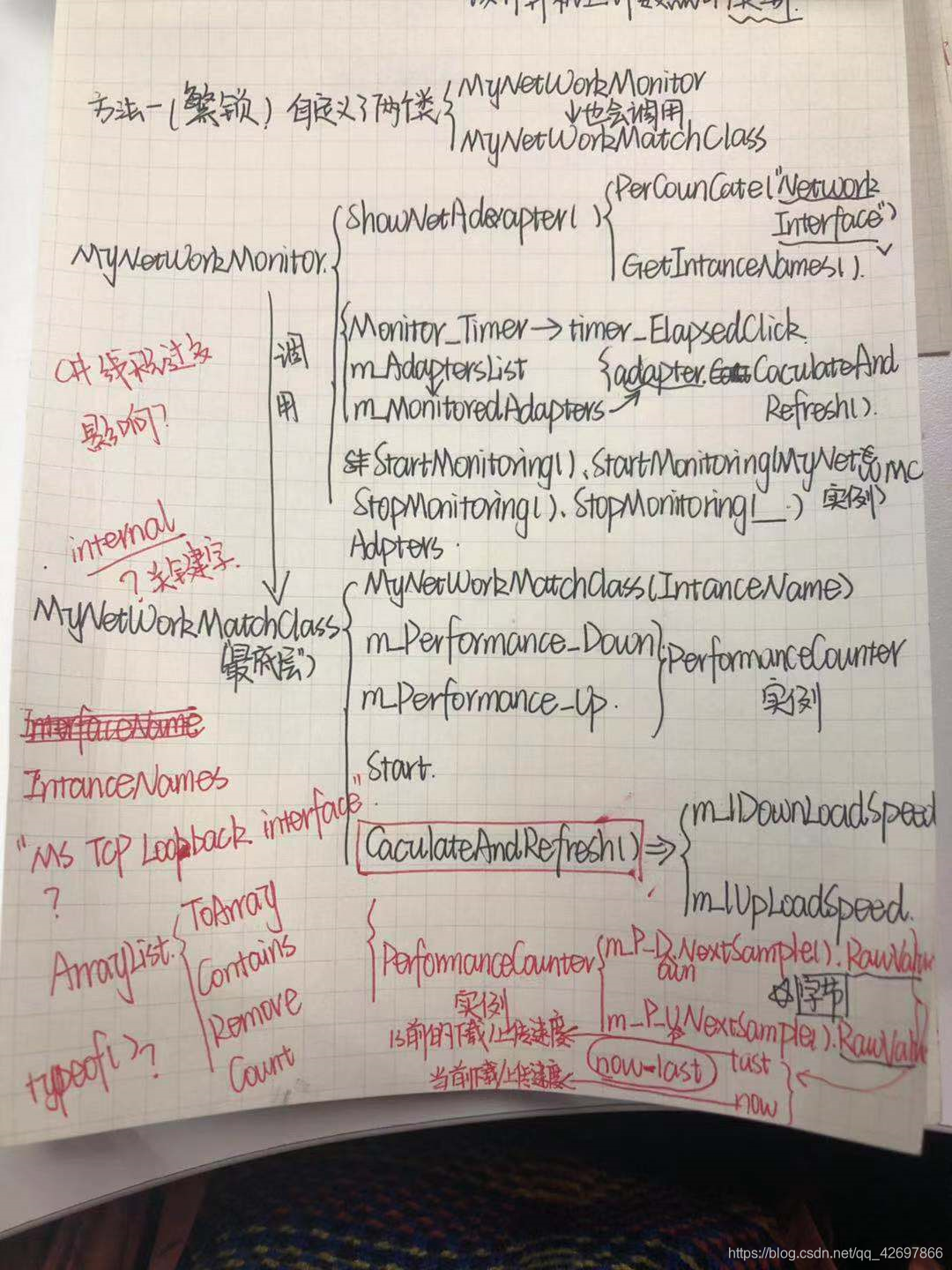
主要有两个类,其一是NetworkAdapter,该类的作用是获取本机网络适配器列表,并且可以通过该类的属性获取当前网速数据;其二是NetworkMonitor,该类是通过.NET的PerformanceCounter(性能计数器组件)监测本机每一个网络适配器对应的当前网速状况(翻译得不大好,具体还是看原汁原味的代码吧:))
NetworkAdapter类
using System;
using System.Diagnostics;

namespace NetWorkSpeedMonitor
{
	/// <summary>
	/// Represents a network adapter installed on the machine.
	/// Properties of this class can be used to obtain current network speed.
	/// </summary>
    public class NetworkAdapter
    {
        /// <summary>
        /// Instances of this class are supposed to be created only in an NetworkMonitor.
        /// </summary>
        internal NetworkAdapter(string name)
        {
            this.name = name;
        }

        private long dlSpeed, ulSpeed;		 // Download/Upload speed in bytes per second.
        private long dlValue, ulValue;		 // Download/Upload counter value in bytes.
        private long dlValueOld, ulValueOld; // Download/Upload counter value one second earlier, in bytes.

        internal string name;								// The name of the adapter.
        internal PerformanceCounter dlCounter, ulCounter;	// Performance counters to monitor download and upload speed.
        /// <summary>
        /// Preparations for monitoring.
        /// </summary>
        internal void init()
        {
            // Since dlValueOld and ulValueOld are used in method refresh() to calculate network speed, they must have be initialized.
            this.dlValueOld = this.dlCounter.NextSample().RawValue;
            this.ulValueOld = this.ulCounter.NextSample().RawValue;
        }
        /// <summary>
        /// Obtain new sample from performance counters, and refresh the values saved in dlSpeed, ulSpeed, etc.
        /// This method is supposed to be called only in NetworkMonitor, one time every second.
        /// </summary>
        internal void refresh()
        {
            this.dlValue = this.dlCounter.NextSample().RawValue;
            this.ulValue = this.ulCounter.NextSample().RawValue;

            // Calculates download and upload speed.
            this.dlSpeed = this.dlValue - this.dlValueOld;
            this.ulSpeed = this.ulValue - this.ulValueOld;

            this.dlValueOld = this.dlValue;
            this.ulValueOld = this.ulValue;
        }
        /// <summary>
        /// Overrides method to return the name of the adapter.
        /// </summary>
        /// <returns>The name of the adapter.</returns>
        public override string ToString()
        {
            return this.name;
        }
        /// <summary>
        /// The name of the network adapter.
        /// </summary>
        public string Name
        {
            get { return this.name; }
        }
        /// <summary>
        /// Current download speed in bytes per second.
        /// </summary>
        public long DownloadSpeed
        {
            get { return this.dlSpeed; }
        }
        /// <summary>
        /// Current upload speed in bytes per second.
        /// </summary>
        public long UploadSpeed
        {
            get { return this.ulSpeed; }
        }
        /// <summary>
        /// Current download speed in kbytes per second.
        /// </summary>
        public double DownloadSpeedKbps
        {
            get { return this.dlSpeed / 1024.0; }
        }
        /// <summary>
        /// Current upload speed in kbytes per second.
        /// </summary>
        public double UploadSpeedKbps
        {
            get { return this.ulSpeed / 1024.0; }
        }
    }
}
NetworkMonitor类
using System;
using System.Timers;
using System.Collections;
using System.Diagnostics;

namespace NetWorkSpeedMonitor
{
	/// <summary>
	/// The NetworkMonitor class monitors network speed for each network adapter on the computer,
	/// using classes for Performance counter in .NET library.
	/// </summary>
    public class NetworkMonitor
    {
        private Timer timer;				// The timer event executes every second to refresh the values in adapters.
        private ArrayList adapters;			// The list of adapters on the computer.
        private ArrayList monitoredAdapters;// The list of currently monitored adapters.

        public NetworkMonitor()
        {
            this.adapters = new ArrayList();
            this.monitoredAdapters = new ArrayList();
            EnumerateNetworkAdapters();

            timer = new Timer(1000);
            timer.Elapsed += new ElapsedEventHandler(timer_Elapsed);
        }
        /// <summary>
        /// Enumerates network adapters installed on the computer.
        /// </summary>
        private void EnumerateNetworkAdapters()
        {
            PerformanceCounterCategory category = new PerformanceCounterCategory("Network Interface");

            foreach (string name in category.GetInstanceNames())
            {
                // This one exists on every computer.
                if (name == "MS TCP Loopback interface")
                    continue;
                // Create an instance of NetworkAdapter class, and create performance counters for it.
                NetworkAdapter adapter = new NetworkAdapter(name);
                adapter.dlCounter = new PerformanceCounter("Network Interface", "Bytes Received/sec", name);
                adapter.ulCounter = new PerformanceCounter("Network Interface", "Bytes Sent/sec", name);
                this.adapters.Add(adapter);	// Add it to ArrayList adapter
            }
        }

        private void timer_Elapsed(object sender, ElapsedEventArgs e)
        {
            foreach (NetworkAdapter adapter in this.monitoredAdapters)
                adapter.refresh();
        }
        /// <summary>
        /// Get instances of NetworkAdapter for installed adapters on this computer.
        /// </summary>
        public NetworkAdapter[] Adapters
        {
            get { return (NetworkAdapter[])this.adapters.ToArray(typeof(NetworkAdapter)); }
        }
        /// <summary>
        /// Enable the timer and add all adapters to the monitoredAdapters list,
        /// unless the adapters list is empty.
        /// </summary>
        public void StartMonitoring()
        {
            if (this.adapters.Count > 0)
            {
                foreach (NetworkAdapter adapter in this.adapters)
                    if (!this.monitoredAdapters.Contains(adapter))
                    {
                        this.monitoredAdapters.Add(adapter);
                        adapter.init();
                    }

                timer.Enabled = true;
            }
        }
        /// <summary>
        /// Enable the timer, and add the specified adapter to the monitoredAdapters list
        /// </summary>
        public void StartMonitoring(NetworkAdapter adapter)
        {
            if (!this.monitoredAdapters.Contains(adapter))
            {
                this.monitoredAdapters.Add(adapter);
                adapter.init();
            }
            timer.Enabled = true;
        }
        /// <summary>
        /// Disable the timer, and clear the monitoredAdapters list.
        /// </summary>
        public void StopMonitoring()
        {
            this.monitoredAdapters.Clear();
            timer.Enabled = false;
        }
        /// <summary>
        /// Remove the specified adapter from the monitoredAdapters list, and
        /// disable the timer if the monitoredAdapters list is empty.
        /// </summary>
        public void StopMonitoring(NetworkAdapter adapter)
        {
            if (this.monitoredAdapters.Contains(adapter))
                this.monitoredAdapters.Remove(adapter);
            if (this.monitoredAdapters.Count == 0)
                timer.Enabled = false;
        }
    }
}
运行效果:
